

How to Book China High-Speed Rail Tickets in 2026
Book China high-speed rail tickets as a foreigner with passport tips, Trip.com vs 12306, 15-day sales, reservations, payment options, and boarding steps.

–15 min read
How to Book China High-Speed Rail Tickets in 2026
Book China high-speed rail tickets as a foreigner with passport tips, Trip.com vs 12306, 15-day sales, reservations, payment options, and boarding steps.
–15 min read
China's high-speed rail is currently the world's largest, fastest, and most punctual transportation system.
- Top speed of 350 km/h, with journeys like Beijing to Shanghai (over 1,300 km) taking just 4.5–6 hours.
- High-speed rail connects almost all provincial capitals and major cities across the country. Stations are usually located in the city center — step out and you're right at metro or taxi stands, unlike airports that are often 40–50 km away.
- Extremely high on-time rate: most trains depart and arrive exactly on schedule, running reliably in rain, snow, or fog. Flights are frequently canceled or delayed; high-speed trains are rarely affected.
- Spacious carriages, comfortable seats, power outlets, quiet environment, and the freedom to walk around — perfect for families with kids or people who need to work, and generally considered more comfortable than flying.
For travel within China, especially distances up to around 1,200 km (745 miles), high-speed rail is almost always the fastest, most hassle-free, and most comfortable option.
Next, let's talk about — How foreign friends can buy high-speed rail tickets with a passport: the simplest, most reliable methods without pitfalls.
Ways Foreigners Can Buy China High-Speed Rail Tickets
Which platforms can you use?
Foreigners can mainly buy China high-speed rail tickets through these three platforms:
- Trip.com: a third-party travel platform designed for international travelers
- 12306: the official China Railway ticketing platform
- Station ticket window: an offline ticket counter inside high-speed rail stations
Quick answer: which option should foreigners choose?
| Your situation | Recommended option | Why |
|---|---|---|
| First time in China, short trip | Trip.com | Supports 24 languages and 44 currencies, provides 24/7 multilingual customer service, and offers easier payment |
| Staying in China long term | 12306 | No platform service fee, better for long-term use after identity verification |
| Already at the station or need in-person help | Station ticket window | Can handle on-site ticket changes, refunds, and manual assistance |
If your travel date is already set, Trip.com is a simple way to book your China high-speed rail ticket with your passport and pay with an international bank card: Book China high-speed rail tickets on Trip.com.
How to choose between Trip.com, 12306, and station ticket windows
1. Trip.com
- China high-speed rail tickets usually go on sale 15 days before departure. Trip.com allows you to submit a reservation earlier, up to about 60 days ahead.
- A reservation is not the same as an issued ticket. Trip.com will try to issue your ticket automatically after the railway system opens sales. If your ticket is still not issued 2 hours before departure, your reservation will be automatically canceled. You can cancel your reservation any time before the ticket is issued.
Pros
- Supports 24 languages and 44 currencies
- Provides 24/7 multilingual customer service, with online chat or phone support
- Supports major international bank cards, Apple Pay, and other payment methods, making payment more stable
- You can enter passport information when booking, with no need to complete identity verification in advance
Cons
- Charges a service fee, with the exact amount shown on the order page
2. 12306
Pros
- No platform service fee
- Faster waitlist response for popular tickets
Cons
- Usually only allows purchases after tickets officially go on sale 15 days before departure
- Requires identity verification in advance, usually taking 3–5 working days
- Has an English version, but the overall experience is not as smooth as Trip.com
- Supports international bank cards, but payment may fail
3. Station ticket window
For short-term travelers, the station ticket window is better used as a backup option. Tickets on popular routes can sell out quickly, so it is better to book online through Trip.com or 12306 first.
Pros
- You can buy tickets at the station window with your original passport
- You can handle ticket changes, refunds, and situations that need manual assistance
- No third-party platform service fee when buying tickets
Cons
- You can only buy tickets that have already gone on sale and still have seats available
- Payment methods depend on the station window. It is best to prepare Alipay or WeChat Pay, RMB cash, and assume international bank cards may not be supported
- Communication can be a problem, and smaller stations usually do not have English-speaking staff
China public holidays are usually much busier for high-speed rail, especially Chinese New Year, Labor Day, National Day, and summer vacation. Tickets on popular routes may sell out soon after they go on sale.
If your departure city, arrival city, and travel date are already set, reserve your China high-speed rail ticket before popular routes sell out: Reserve China high-speed rail tickets on Trip.com.
Start Booking
What should you prepare before booking?
-
Passport information: used to fill in the passenger name, ID type, and passport number.
-
Departure and arrival stations: many Chinese cities have multiple train stations, so confirm the correct station before booking.
-
Travel date: used to search train schedules, availability, and whether tickets have officially gone on sale.
-
Payment method: Trip.com supports major international bank cards, Apple Pay, and other payment methods; 12306 supports major international bank cards. If 12306 payment fails, you will need to register and use WeChat Pay or Alipay.
Understand China high-speed rail before booking
-
Train type
When booking, the train number shows the train type. China high-speed train numbers usually start with G, D, or C, and you can also select High-speed trains only to show high-speed rail services only.
Type Speed G-trains Top speed 350 km/h (217 mph) D-trains Top speed 250 km/h (155 mph) C-trains Top speed 200 km/h (124 mph) -
Seat class
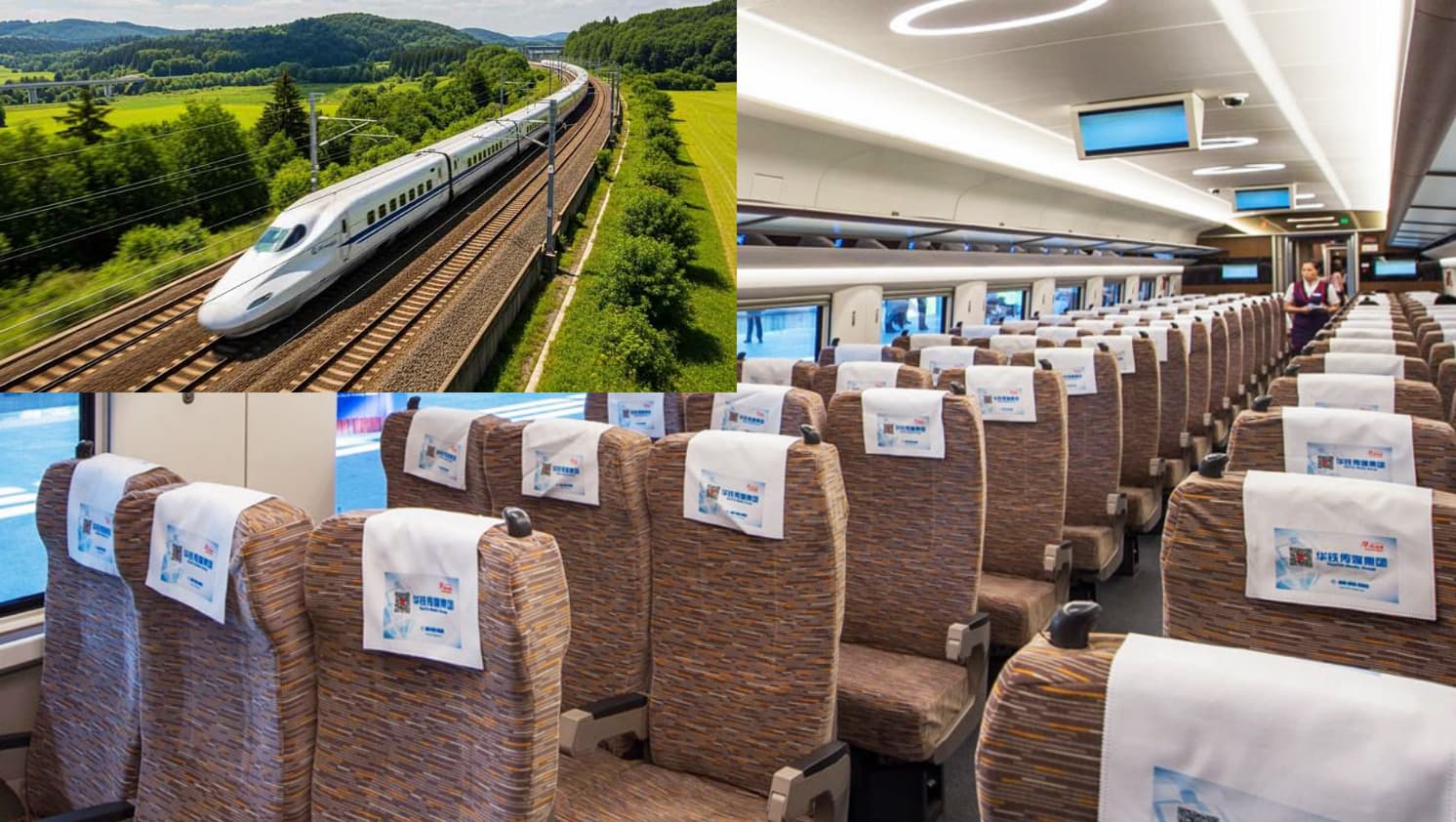
Type Description Second Class 3+2 seating layout, with foldable tray tables and power outlets; comfortable enough for most trips First Class 2+2 seating layout with more space Business Class 2+1 or 1+1 seating layout; some trains provide meals, priority boarding, and station lounge access -
Station names: many Chinese cities have multiple high-speed rail stations, such as Beijing South, Beijing West, and Shanghai Hongqiao. Confirm the correct station before booking so you do not choose one far from your hotel, airport, or destination.
Book Online with 12306 and Trip.com
Both 12306 and Trip.com support website booking. This walkthrough uses the mobile apps as an example, and you can also use the web versions:
12306
1. Registration
-
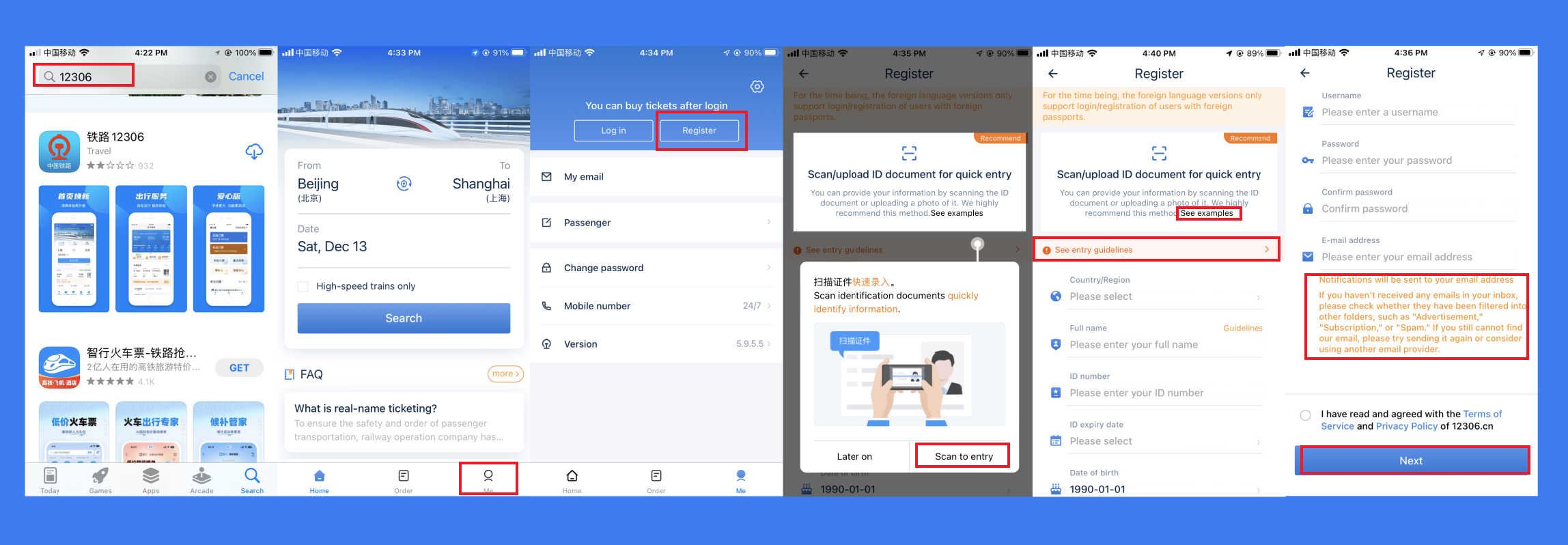
Search for "12306" in your app store and download the app.
-
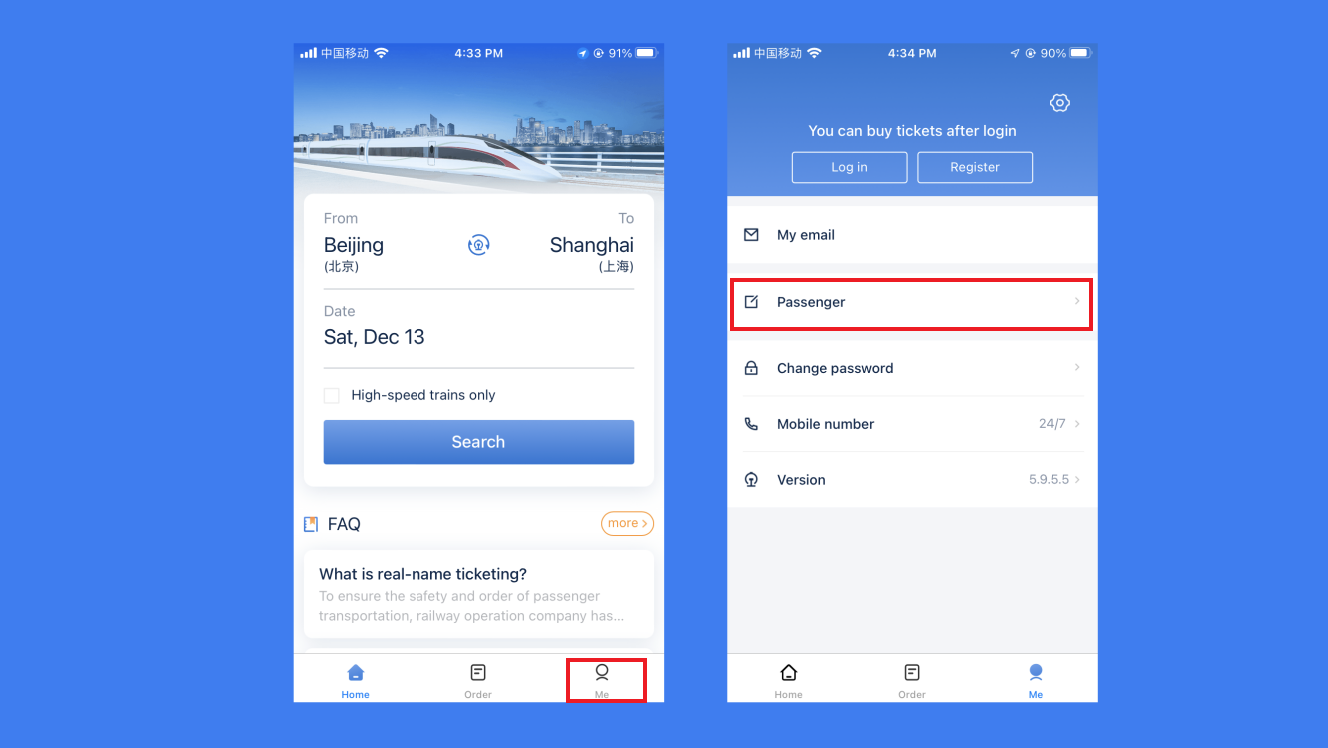
Open the app, go to [Me] → [Register] to access the registration page.
If your app is in Chinese, you can switch the language to English in the settings page (top-right corner on the Me tab). Currently only English is supported.
-
You can choose [Scan to entry] to quickly upload your passport details, or enter them manually.
When uploading your passport, make sure the image is clear for better machine recognition.
There is a 【See entry guidelines】 button on this page — click it to see how to correctly fill in your full name and passport ID number (guidelines vary by passport type; find yours and follow the instructions).
-
Finally, set your app password and enter your email address, then click [Next]. If the information is correct, 12306 will send a verification email to your inbox.
App tip: A notification will be sent to your email. If you don't see it in your inbox, check other folders such as "Promotions," "Subscriptions," or "Spam." If you still can't find it, try resending or use a different email provider.
-
Go to your email, find the message, and click the link to verify.
2. Complete Identity Verification
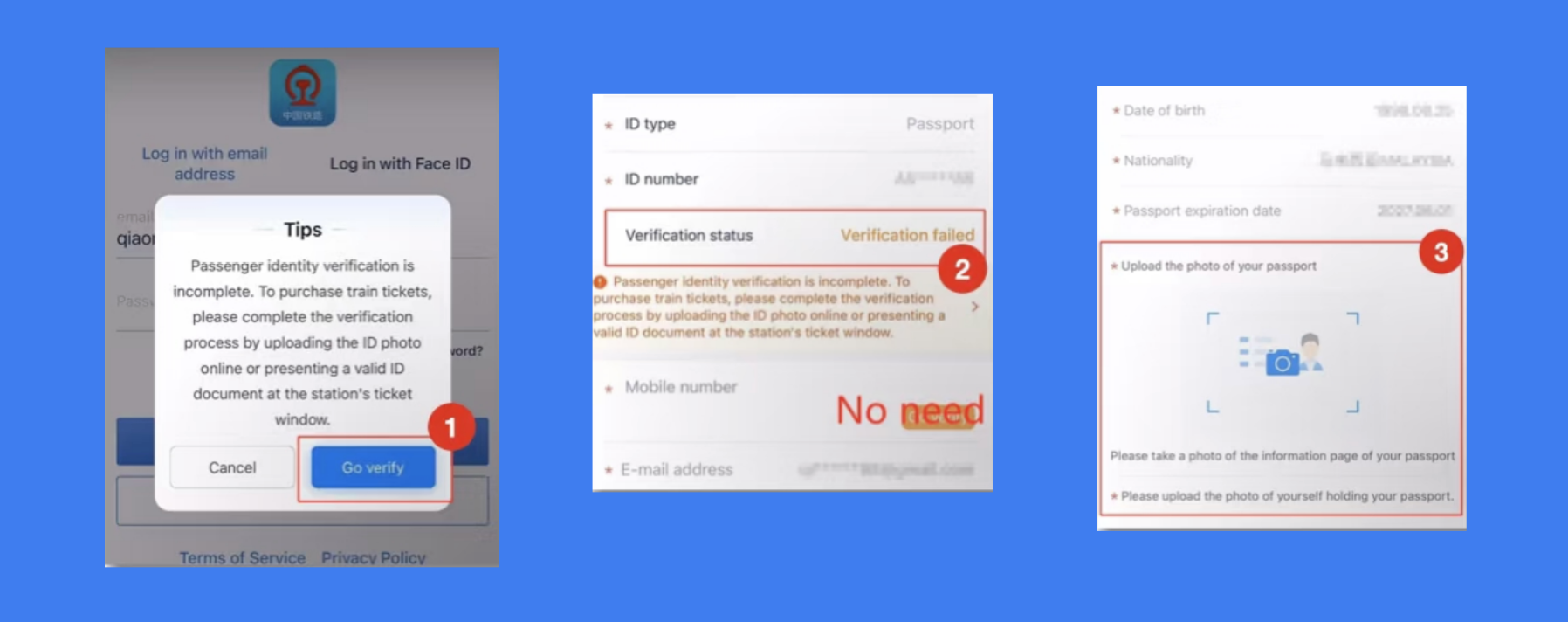
- After email verification, log in with your email. You will see a prompt reminding you to complete identity verification — without it, you cannot purchase train tickets.
- Submit two clear photos: your passport and a selfie holding your passport. Verification usually takes 3–5 working days, so plan ahead before booking.
3. Add Other Passengers (Optional)
If you need to buy tickets for others, add their information here.
- In the app, go to [Me] → [Passengers] and add new passengers.
- Enter the passenger's name, passport ID, etc. Verification takes 3–5 working days.
- Once all passengers in the [Passengers] page show Verified, you can start booking.
4. Booking Tickets
-
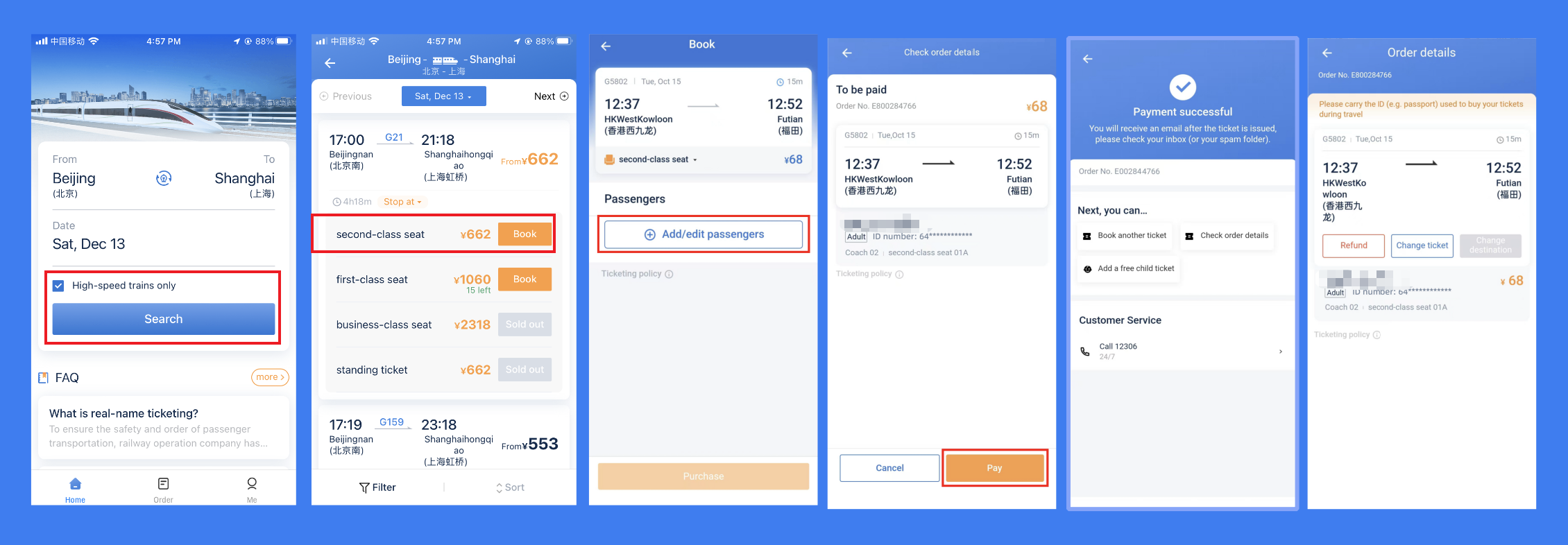
On the home page, select departure (From) and arrival (To) stations.
-
Choose your travel date. You can tick [High-speed trains only] to filter for high-speed rail only.
-
Tap [Search] to view the train list. Select a train based on time and choose your preferred seat class.
Note: A city may have multiple high-speed rail stations — make sure to pick the correct one.
-
After selecting seats, choose the passenger(s), confirm train and seat details, then proceed to payment.
-
Supported payment methods include international credit and debit cards (Visa, Mastercard, JCB, Diners Club, Discover).
-
If you want to use WeChat Pay or Alipay, refer to:
-
-
You can view your orders on the home page under [Order], where you can check ticket gate, carriage, and seat information before departure.
Trip.com
1. Registration
-
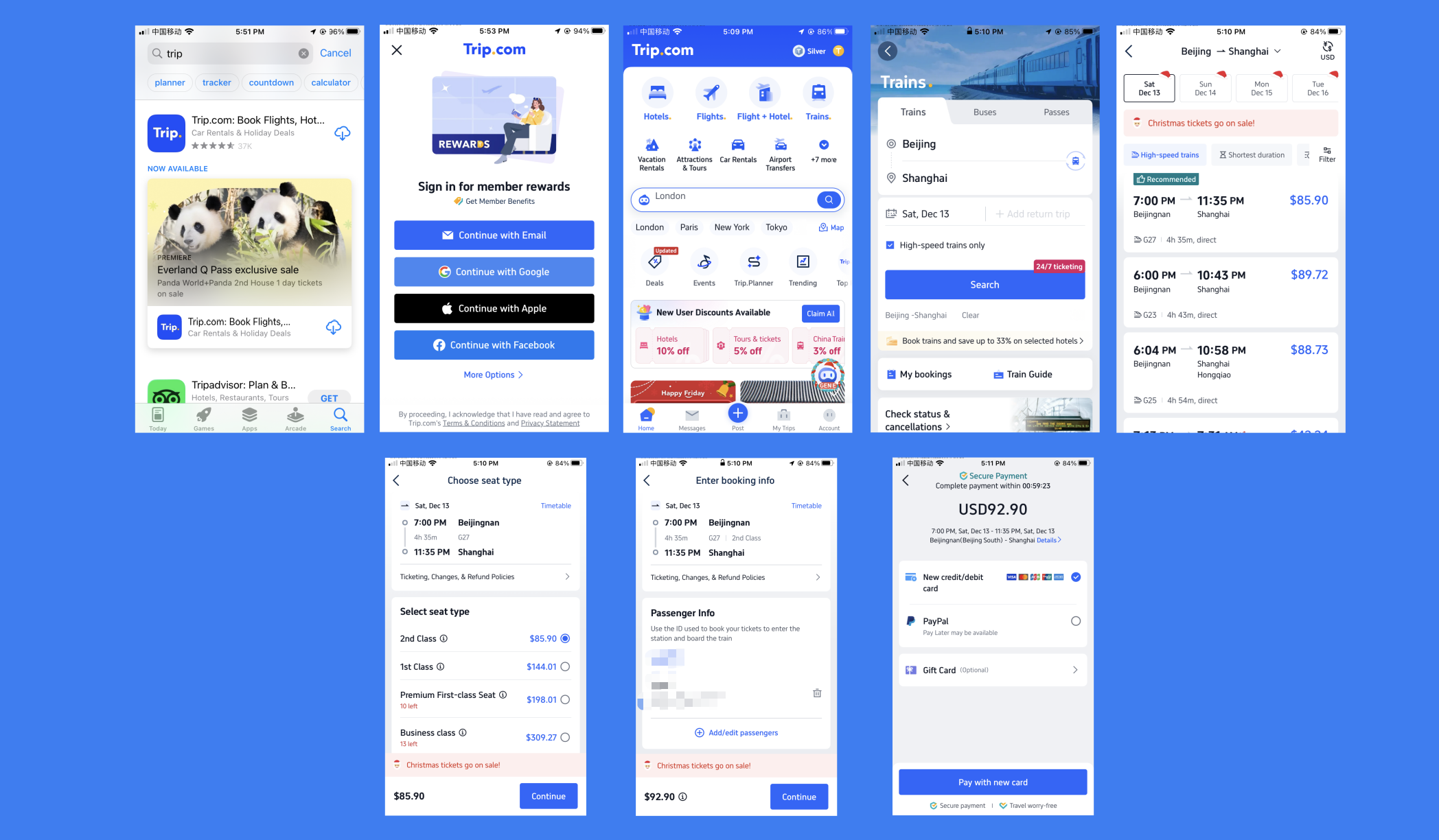
Search for and download the Trip.com app from your app store, or open the Trip.com train booking page directly.
-
Open the app and tap [Sign In] to register.
Registration options include Email, Google, Apple, Facebook, and more.
2. Booking Tickets
- On the home page, tap [Trains] to enter the ticket booking section.
- Select your departure station and arrival station.
- Choose your date. You can tick [High-speed trains only] to search for high-speed rail on that day.
- After selecting a suitable seat class, add passenger details, confirm the train information, and proceed to payment.
Supported payment methods include major international credit and debit cards (Visa, Mastercard, JCB, American Express), Apple Pay, and more.
- You can view your orders on the home page under [My Trips], where you can check ticket gate, carriage, and seat details before departure.
Riding High-Speed Rail
Since the process is quite long, here is a simple step list for quick reference:
- Steps:
Manual channel (passport) → Security check → Gate → Platform → Carriage
- Number sequence:
Station → Gate number → Platform number → Carriage number → Seat number
Before Departure
- Make sure to bring your passport. Riding high-speed rail only requires passport verification, and you do not need to collect a paper ticket.
- It is recommended to arrive at the high-speed rail station 30 minutes to 1 hour in advance. Check the station name on your ticket; during peak tourist seasons, allow even more time.
- You can view your travel details in the booking app, including train number, seat number, and gate number. Save a screenshot of your order in advance in case the network is poor or the app cannot open at the station.
Station Entry and Boarding Process
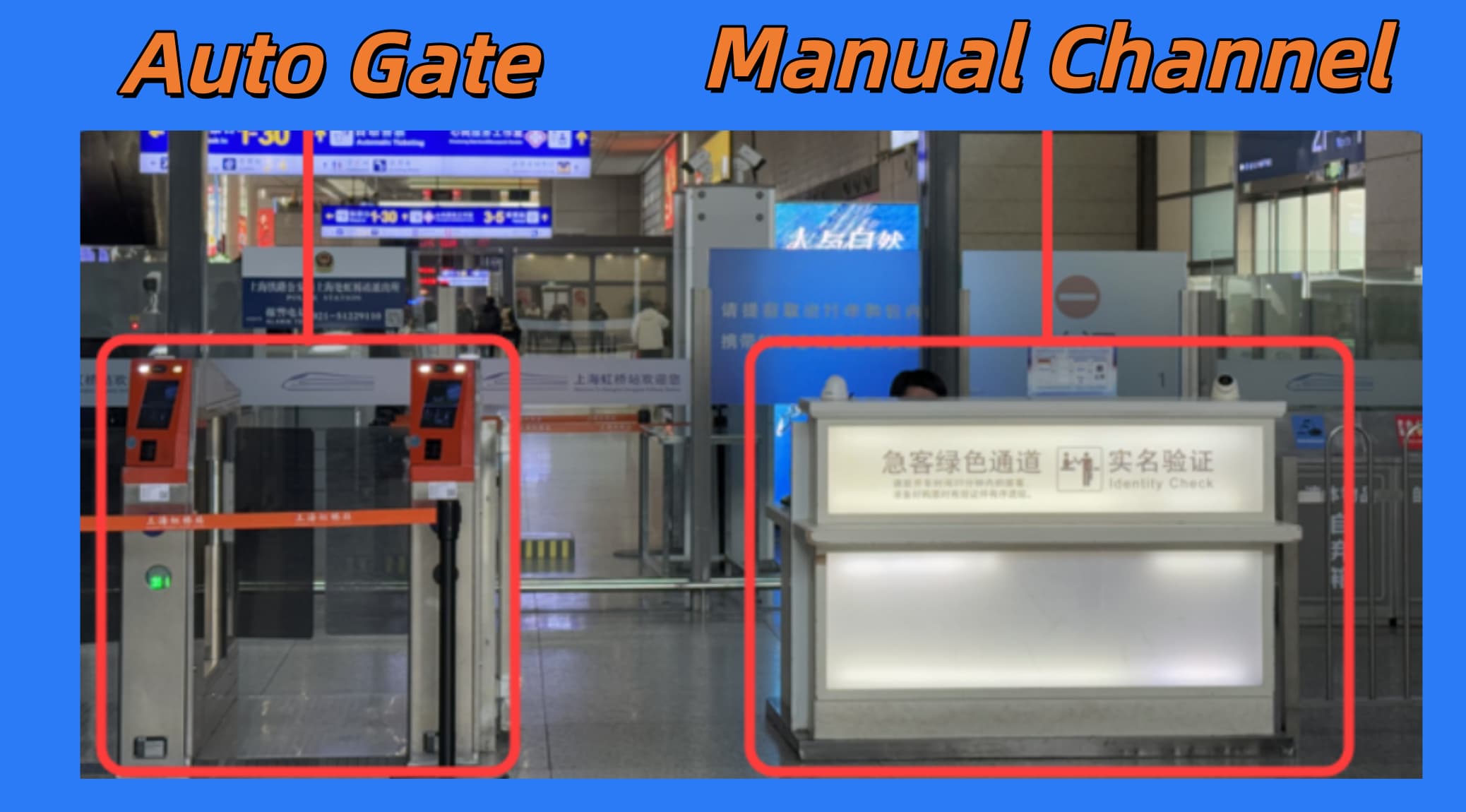
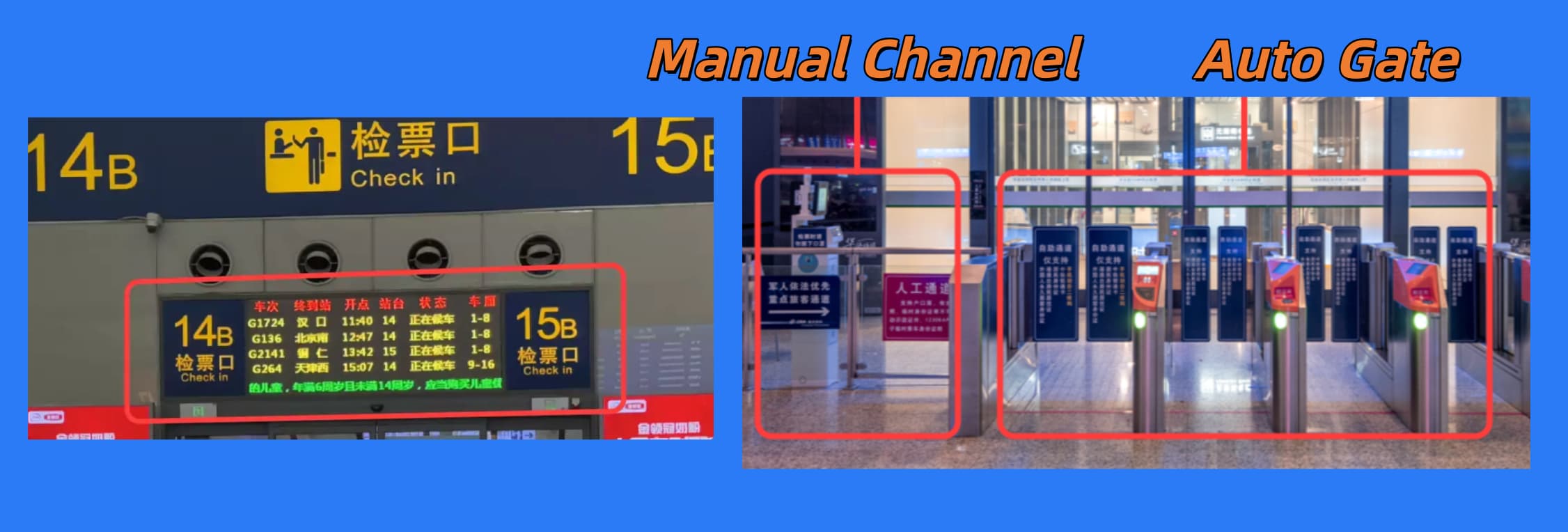
- Upon arriving at the station, present your passport at the manual channel for identity verification, as automatic gates may not support passports.
Automatic gates support Chinese permanent residence permits, Hong Kong/Macau/Taiwan residence permits, or travel documents.
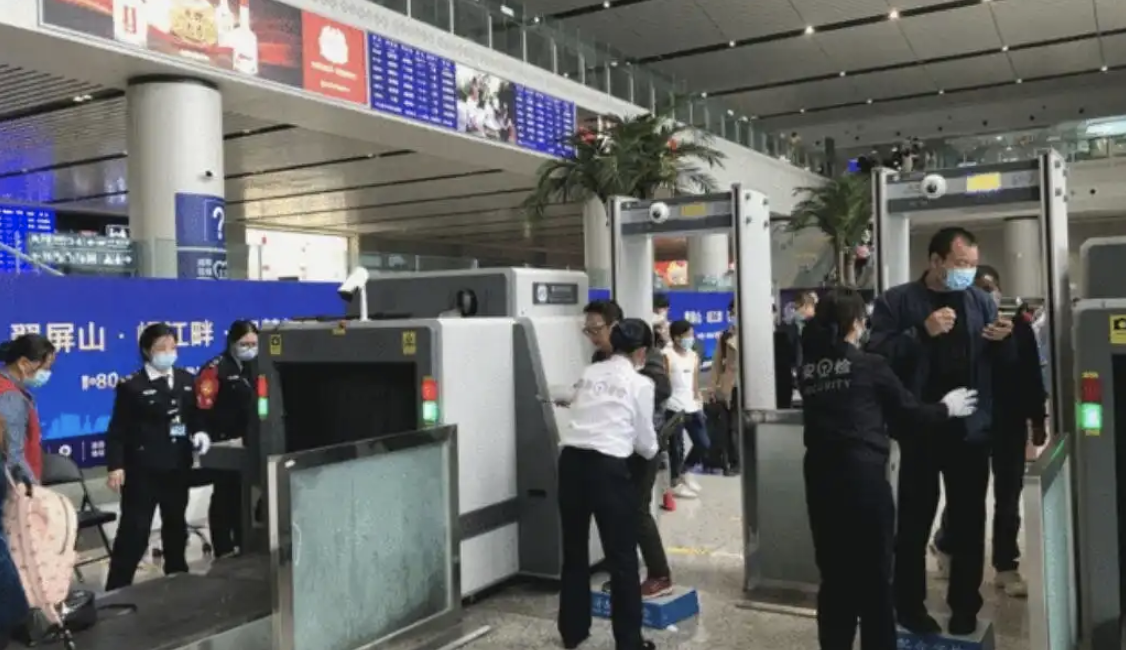
- After entering the station, go through security check for luggage and personal items.
Some items are not allowed on high-speed trains; you can check the prohibited items.
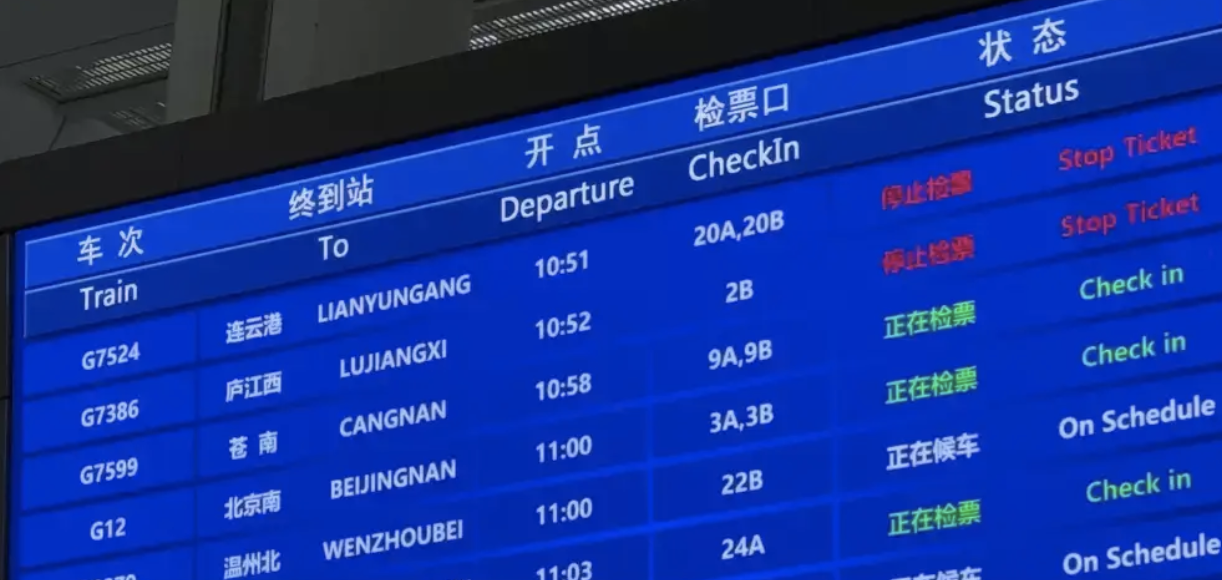
- After security check, enter the waiting hall. Ask staff or watch the large screens/broadcasts for gate number(CheckIn), departure time, etc.
Waiting halls provide seating areas, restrooms, water fountains, and convenience stores.
-
Arrive at your gate 15–30 minutes early to wait for boarding (boarding usually starts 3–5 minutes before departure).
Gates usually have large screens above showing train number, departure time, and platform number.
-
When boarding begins, since automatic gates may not support passports, it is best to use the manual channel for verification.
-
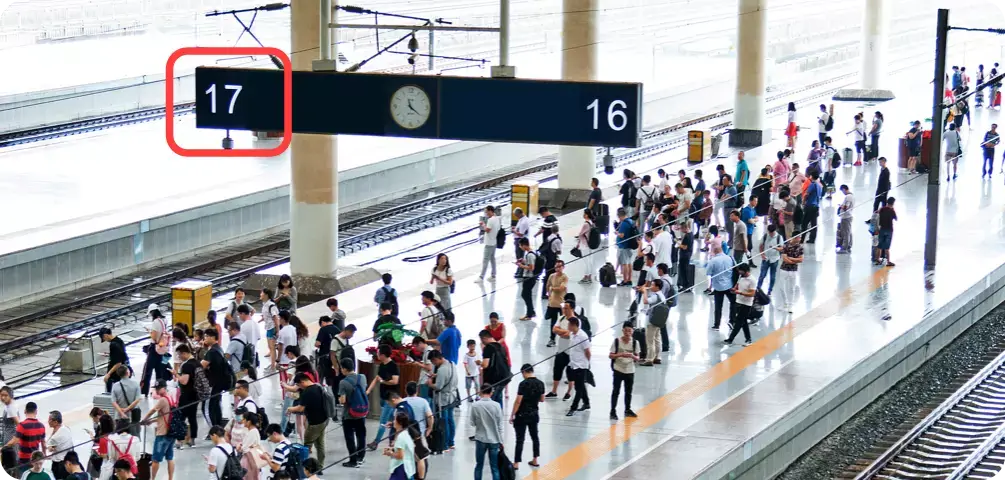
After entering the platform area, trains are typically on both sides (two platforms). Confirm your platform number in advance and queue at the correct one.
-
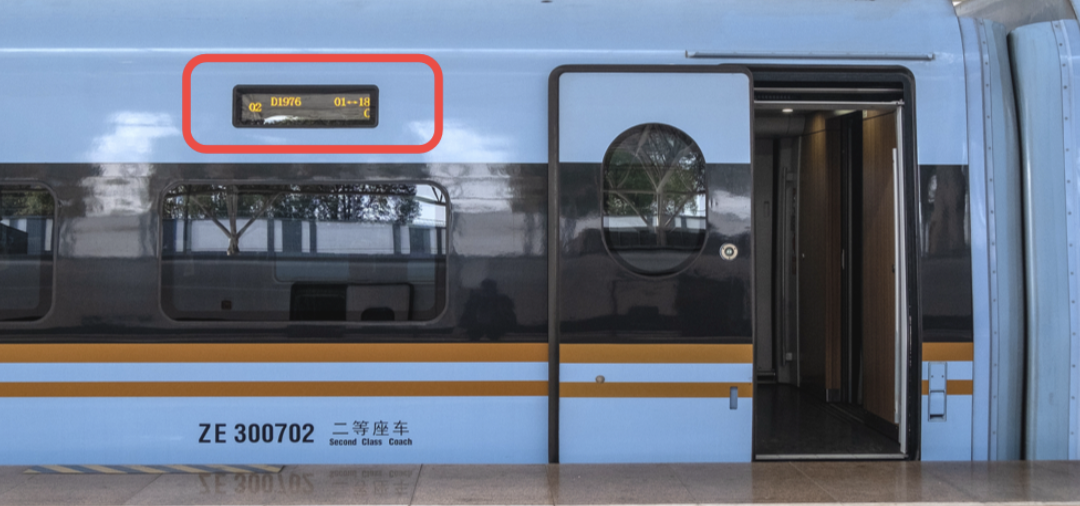
Each carriage displays the train number and carriage number outside — find the correct carriage and board.
-
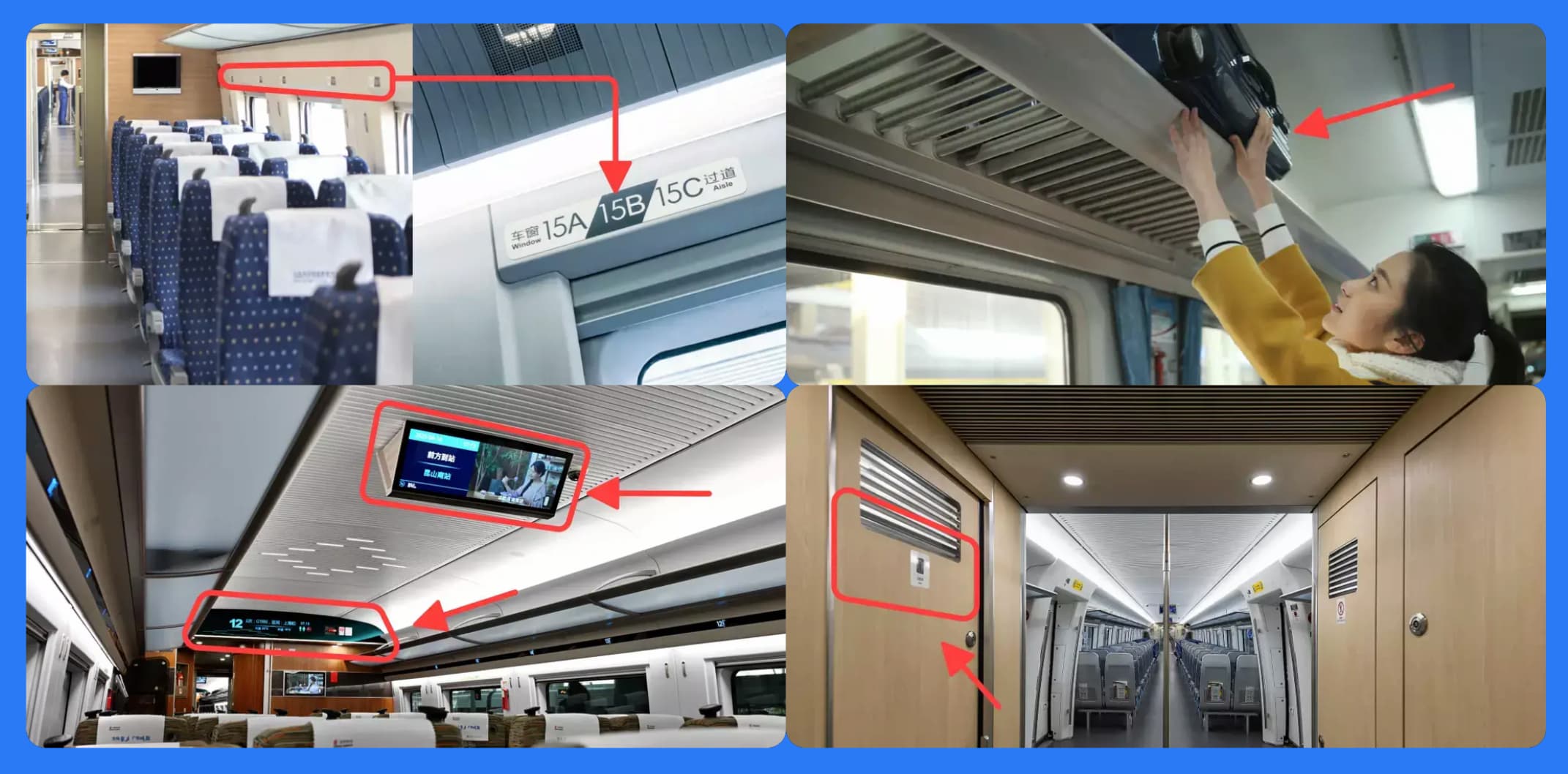
Inside the carriage, seat numbers are displayed above the windows — locate your seat using the number.
-
Overhead luggage racks are available above the seats for large bags.
-
Restrooms are located at both ends of the carriage. You can ask staff how to order meals (some trains have a dining car, or you can scan a QR code at your seat with WeChat/Alipay).
-
Pay attention to in-carriage announcements or LED screens for arrival information to avoid missing your stop.
Other Matters
Children
Children under 14 must be accompanied by an adult, unless they are students commuting to school by train or have an approved care arrangement from the railway company.
- Ages 6–13: Child discount ticket
Child discount tickets must match the accompanying adult's ticket in departure date, train number, and seat class, and the destination cannot exceed the adult's.
- Age 14 and above: Full-price ticket
- Under 6 years old: Free ticket
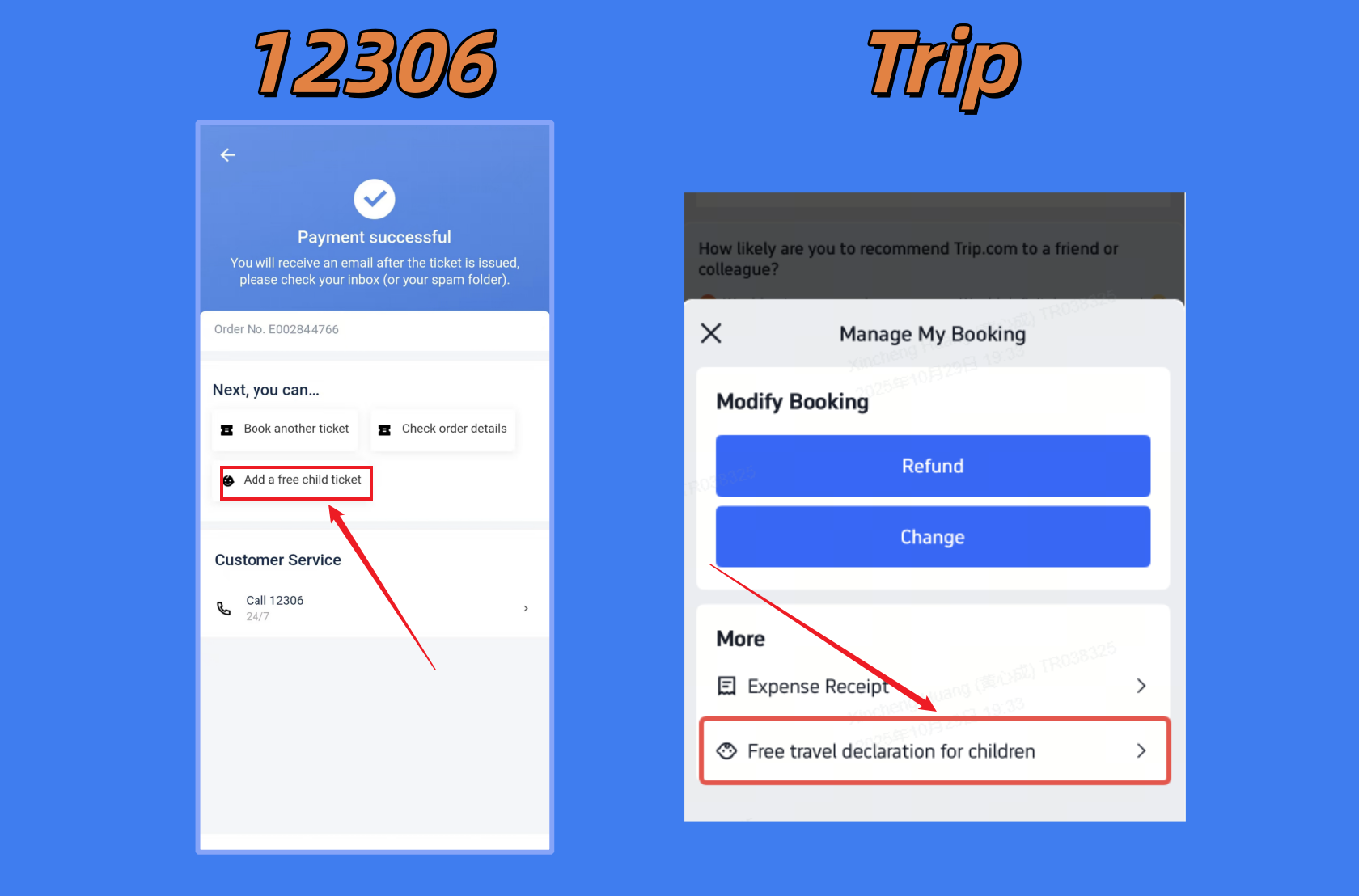
One adult can bring only one child for free, and the child has no separate seat. If bringing more than one child or wanting a separate seat, purchase a child discount ticket. If traveling with a child, declare it after booking to link the child to the itinerary for boarding.
Prohibited Items
To ensure passenger safety, high-speed rail has strict restrictions on prohibited items. For more details, refer to the 12306 Official FAQ.
- Guns and ammunition (major components included)
- Explosives (bombs, dynamite, detonators, fireworks, gunpowder)
- Knives, batons, bows/arrows, and other sharp or blunt objects that may endanger passengers
- Flammable and explosive items (compressed/liquefied gases, liquids containing flammable solvents or flammable liquids, flammable solids, spontaneously combustible items, water-reactive substances, oxidizers, and organic peroxides)
- Toxic chemicals (highly toxic, corrosive, radioactive, infectious, and hazardous items)
- Other items (strongly magnetic items, items with strong irritating odors, live animals)
In addition to prohibited items, some are restricted:
The following are just examples from the regulations. If unsure about an item, check specifically.
- Sealed, clearly labeled alcohol (24%–70% ABV) ≤ 3000 ml
- Clearly labeled portable power banks/lithium batteries with rated energy ≤ 100 Wh (except electric wheelchairs with lithium batteries)
- Nail polish/remover ≤ 50 ml
- Flammable everyday items in non-aerosol containers (perfumes, Florida water, sprays, and gels) ≤ 100 ml, one per type
- Cold perm solutions, hair dyes, hair mousse, hairspray, insecticides, air fresheners, and other aerosol containers ≤ 150 ml, total ≤ 600 ml, one per type
- Safety matches ≤ 2 boxes
- Ordinary lighters ≤ 2
Free Luggage Allowance
- Weight
- Adults: 20 kg
- Children: 10 kg (including free-ticket children)
- Diplomats: 35 kg
- Maximum size: 130 cm (non-high-speed trains may allow up to 200 cm items)
- Folding wheelchairs and strollers can be carried free and do not count toward the allowance
Ticket Changes (Rescheduling)
If you booked via app, changes and refunds can usually be done in the app. For special cases, contact customer support or visit a station ticket window.
Change and refund rules follow official 12306 policy. Trip.com may differ slightly; see Train Travel Guide and Policies
With available seats, passengers can change tickets once for free (date, train, seat class, destination). Fee rules:
Free changes:
- More than 48 hours before departure
- 24–48 hours before departure, changing to a train departing before 24:00 on the same day
- After departure, changing to another train on the same day
Fees apply:
- 24–48 hours before departure, changing to a later date → 5%
- Less than 24 hours before departure, changing to a later date → 15%
- After departure, changing to the next day or later → 40%
Special rules for changing destination:
- Must apply more than 48 hours before departure
- Once destination is changed, no further changes to date, train, or seat class are allowed
Refunds
- 8 days or more before departure → 0% fee
- More than 48 hours before departure → 5%
- 24–48 hours before departure → 10%
- Less than 24 hours before departure → 20%
Reimbursement (Invoicing)
Reimbursement processes may change, so the following is for reference only. Always follow app prompts or confirm with customer support.
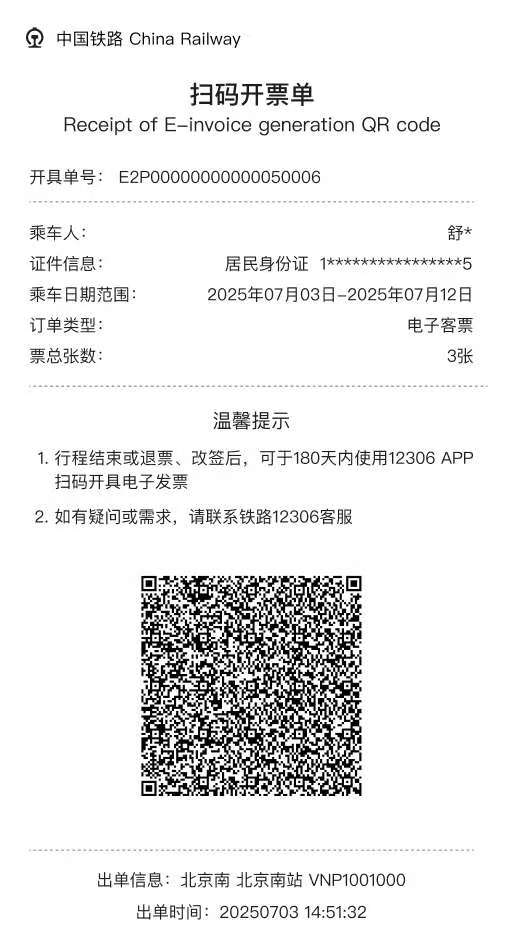
- Regardless of booking on 12306 or a third-party app, register and log in to the 12306 app to find the electronic invoice issuance entry in the orders page.
- If booking for others, go to a station ticket window or self-service machine with valid ID to obtain a QR code invoice, then scan it in the 12306 app within 180 days to issue the invoice.
Popular Route Travel Times
Times below are pure running times only and do not include advance arrival for security checks. Different trains have varying speeds, so times are ranges. Exact times are shown during booking.
- Beijing to Shanghai: ~1,300 km, ~4.5–6 hours
- Shanghai to Hangzhou: ~170 km, ~45–90 minutes
- Hangzhou to Suzhou: ~160 km, ~40–120 minutes
- Beijing to Xi'an: ~1,200 km, ~4.5–6 hours
- Shenzhen to Guangzhou: ~130 km, ~30–60 minutes
- Guangzhou to Hong Kong: ~140 km, ~50–90 minutes
FAQ
Where can I book a Chinese high-speed train?
Foreigners can book China high-speed rail tickets through Trip.com, 12306, or a station ticket window. For short trips, Trip.com is usually the simplest way to book online with a passport and international bank card; for people staying in China long term, 12306 is useful after identity verification.
When can I book China high-speed rail tickets?
China high-speed rail tickets usually go on sale 15 days before departure. Trip.com allows you to submit a reservation earlier, up to about 60 days ahead; after railway sales open, the platform will try to issue the ticket automatically.
Do I need to book China high-speed rail tickets in advance?
Yes. It is best to book in advance, especially during Chinese public holidays such as Chinese New Year, Labor Day, National Day, and summer vacation, when popular routes can sell out quickly. If your itinerary is already set, book your ticket as early as possible on Trip.com. For trips more than 15 days away, Trip.com can also help you submit an early reservation before official ticket sales open.
How do foreigners buy high-speed train tickets in China?
Foreigners need to enter their passport name, ID type, and passport number when booking. You can book directly on Trip.com with passport information, or complete identity verification on 12306 before buying there; if you buy at a station ticket window, bring your original passport.
How do foreigners register for 12306?
Foreigners can register in the 12306 app with an email address, then upload a passport photo and a selfie holding the passport to complete identity verification. Verification usually takes 3–5 working days, and you can buy high-speed rail tickets on 12306 after approval.
Links
Written by
Richie Shi
I’m Richie. I help foreigners solve problems related to China. Feel free to reach out directly.
Recommended articles
All guidesHow to Book Hotels in China as a Foreigner: 2026 GuideCompare Trip.com, Agoda, Booking.com, Expedia and local hotel apps, then avoid issues with foreign guest policies, passports, credit cards and deposits.Richie Shi China SIM Card, eSIM or Roaming? 2026 Guide for ForeignersCompare China SIM cards, eSIMs, and roaming in 2026, with airport vs city buying tips, carrier choices, passport rules, and VPN advice.Richie Shi
China SIM Card, eSIM or Roaming? 2026 Guide for ForeignersCompare China SIM cards, eSIMs, and roaming in 2026, with airport vs city buying tips, carrier choices, passport rules, and VPN advice.Richie Shi